Showing posts with label 5. Show all posts

Monday, 23 June 2014

Iphone: Bring back (our beloved) facetime on Ufone and Telenor (now Mobilink,Warid and Zong also) network IPhones

[Note:] This is my old post from last year focusing on ufone and telenor only, but now i have patched all networks configurations so im updating them here! 

Hello all,
Three days back I got and update on my IPhone for carrier settings, as normal i updated it. It just took a second and everything seems fine! First thing I noticed the carrier name "PK-UFONE" turned to "Ufone" and it looked quite pleasing :)

But as the day passed and on that night later i want to call my cousin in New York, i realized my facetime app was missing. i quickly popped down the search bar and types facetime and the results only showed facebook, but no facetime. It was a great disappointment :( how ufone blocked my my facetime i was really very angry!
Well searching well on the internet i met miTime, but it required jalibreak, but im not a very big fan of JB n planned to search something else.

Long story short, i have found the hack to unlock facetime again and here it is explained:

The carrier setting in IOS are called Carrier bundles, in these bundles all the carrier provided settings are deployed to iphone including limitations and restrictions on changing apn and blocking facetime as well.

Step 1.


First unlock iTunes to enable detection of carrier config files
Out of the box, iTunes will not usually allow bundles to be sideloaded onto an iOS device. To make iTunes play nice, it’s easily fixed
For Mac OS X; open up Terminal.app and paste in the following;
defaults write com.apple.itunes carrier-testing -bool true
For Windows, open up Run (Winkey+R) and paste the following;


"%ProgramFiles%\iTunes\iTunes.exe" /setPrefInt carrier-testing 1
 "C:\Program Files (x86)\iTunes\iTunes.exe” /setPrefInt carrier-testing 1
If you’re running Windows x64 bit, do this instead:

Step 2

Download your network's (facetime enabled) iphone-carrier-config (ipcc) file:

old_Ufone: download
old_Telenor: download

[New additions:]
Ufone: download
Telenor: download
Warid: download
Mobilink: download
Zong: download

(Old files are for IOS 7.1.x)

Step 3


Loading .ipcc Files onto an iPad or iPhone with iTunes
Now that carrier mode is enabled, you can load carrier files onto the iOS device. In either OS X or Windows:
  1. Connect the iOS device to the computer
  2. Launch iTunes and hold the Option(Shift) key while clicking on “Check for Update” to load an .ipcc file
  3. Select the .ipcc file to sync the .ipcc to the iOS device
  4. Disconnect the iOS device and reboot it for changes to take effect

Step 4

Well there is no step 4, mine was done in these steps only :) I hope you guys also get facetime back with these steps only

Please comment if you guys need any help 

Please note, you will be notified again for the Carrier settings, please ignore this and dont install new update, else you will again loose your facetime.

Just to be sure i am attaching my phones screenshots


Tuesday, 12 November 2013

Google Nexus 5 Camera [TWEAK]

Google has been creating waves yet again with their recently launched Nexus 5 running on the new Android 4.4, KitKat with the two most talked about things being its camera and the other exciting features that the latest Android variant has to offer. Even though the Nexus 5 has a fairly decent shooter, it is still not as good as those found in the Samsung Galaxy S4 and the Note 3. For those who have already purchased a Nexus 5 and/if they haven’t been impressed with its camera need not to be worried about anything. Our friends at XDA are currently working on a new camera app that promises to add a host of new features and at the same time also improves the camera’s overall performance. Here’s a quick look at what we should expect to see with the new camera app update:
  • Sound Recording now in Stereo with the secondary Mic
  • Faster Focusing for the camera
  • Front Camera also records 720P Videos@ 20 Mb/s
  • Front camera Audio Bitrate@ 192000 Kb/s
  • AntiBanding default set to 50Hz
  • Focus Range Adjusted
  • Enhanced Smooth Zoom
  • Turned Edge Enhancement ON
For those of you who have already rooted their devices can head on over to the XDA forum, choose your desired zip file and download the pack. So how did you like the new camera experience ? Do share in your experiences with us.
Note: Kindly download and install the app entirely at your own risk. TAP would not be held eligible for any damage   done to the device during/after the installation.

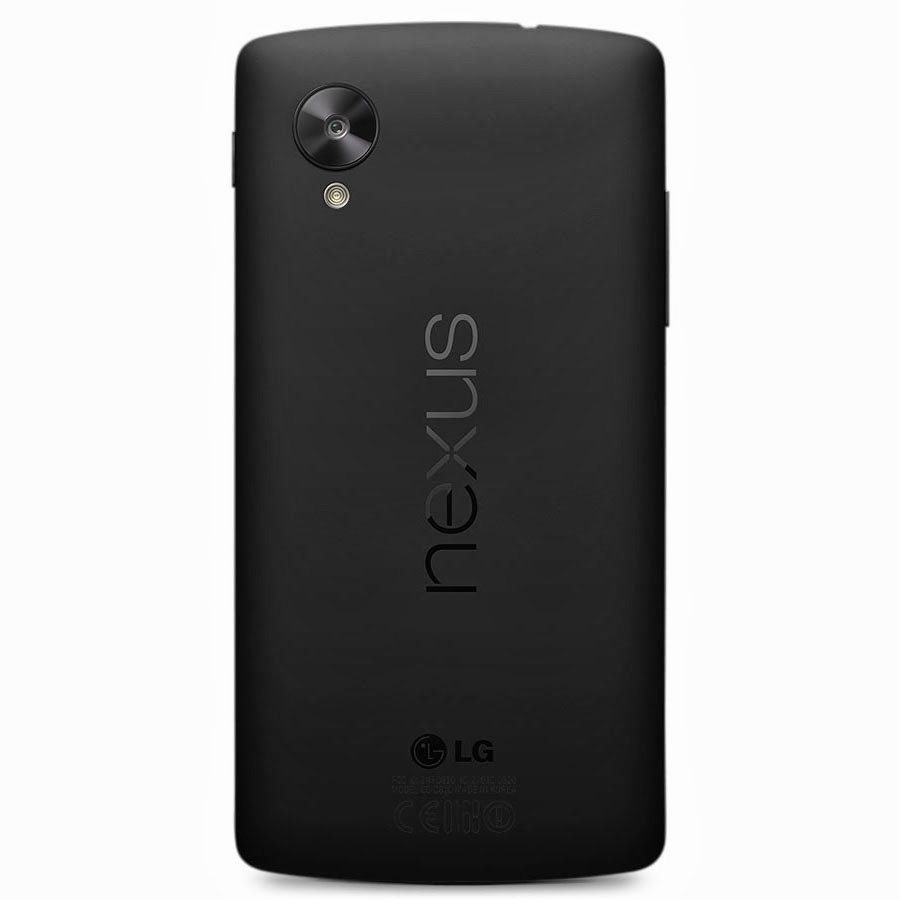
The new Google Nexus 5


Google’s most anticipated device of the year, the Nexus 5 has finally arrived in the Play Store ending days (and months) of speculations, leaks and rumors. The Nexus 5 does manage to live up to its much anticipated hype and the one department where it tends to stand out from the rest is most certainly its camera that comes bundled with Optical Image Stabilization (OIS) a feature that is currently missing in any of the other high end devices available in the market; so credit should be given to LG (Google have decided to stick with them after the success of the Nexus 4) for making it available for the Nexus 5.
                           

The Nexus 5 is now available in the Play Store in two variants, 16GB and 32GB and priced at $349 and $399 respectively. The smartphone comes in two colors Black and White, though only the back of the device color changes from the front it is Black only. As far as carriers are concerned, we have come across Sprint and T-Mobile who are currently the only two official carriers for the device. Sprint is said to launch the device on November 8th with the 16GB version available for $150 and the 32GB for $200. T-Mobile on the other hand haven’t confirmed a release date as yet but it is expected that the device would be launching soon (hopefully before Christmas).

When it comes to hardware and features, the Nexus 5 thoroughly deserves to be in-line with the other higher end devices currently available in the market is the only device (for now) to be running on Google’s latest Android 4.4, KitKat. Anyone of you interested in placing an order anytime soon ? For those who have already got their hands on the device may feel free to share in their experience with us. Cheers !

Nexus 5 Specs at a Glance

  • 5-inch display with 1920×1080 resolution
  • Qualcomm Snapdragon™ 800, 2.3GHz
  • 2GB of RAM
  • 8 megapixel rear camera, 1.3 megapixel front camera
  • Android 4.4 KitKat
  • 16GB / 32GB of internal storage
  • WiFi ac, NFC, and Bluetooth 4.0 LE
  • 2,300 mAh battery with wireless charging built-in
  • microUSB with SlimPort

Thursday, 7 November 2013

New iOS 8 Concept


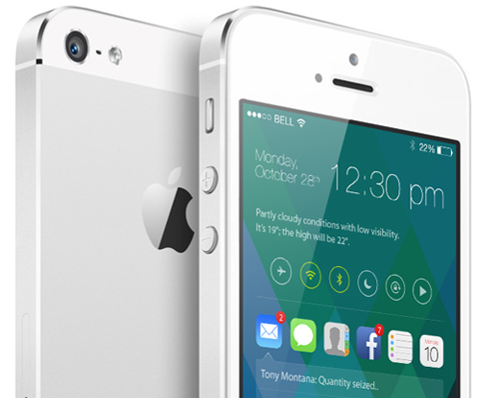
iOS 7 may only have been around for six or so weeks, but already, some are looking ahead towards its eventual successor, iOS 8. There’s no doubt that, at least in terms of design, iOS 7 has been the biggest jump in the operating system’s lifespan, but like any piece of software, there’s still plenty of room for improvement both to looks and general functionality. With this in mind, designer Sangam Bhandari has come up with a rather beautiful concept of iOS 8, and even though we do like the changes Apple and Jony Ive have made with 2013′s release, it’s hard to pick holes in this elegant, ingenious figment of Bhandari’s imagination.
The whole idea encircles a revamped home screen, which is a great deal more functional than the current grid of app icons. In spite of the alterations made over the past twelve or so months, it cannot be denied that the home screen is still fairly one-dimensional, but Bhandari’s concept turns this completely on its head.


It works almost as an amalgam of the current Notification Center and Control Center, bringing hordes of information to the fore at a glance. By flitting between icons of your notification-intensive apps – Mail, Messages, Phone et al – you can readily check your notifications directly from your home screen. Presumably, you could also tap on these notifications and deal with them there and then, without the need to open said app, although this is not explicitly detailed in the concept.
As well as functioning a lot better, the concept has a generally inviting and engaging feel to it. A smartphone interface, or any interface for that matter, should be designed to play as nicely with the usership as possible, and this iOS 8 concept really does.
The great thing about this iOS 8 concept is that, despite having much going on, it still manages to look fairly minimal. It’s not overly cluttered with unnecessary add-ons, and as big fans of simple, understated design here at Redmond Pie, we’d definitely call this one a winner.
What do you think? Would you be impressed if, come next year’s WWDC, Apple unveiled something along these design lines, or are you happy with how iOS 7 looks like in its current form? Do share your thoughts below!