Showing posts with label iphone. Show all posts

Monday, 23 June 2014

Iphone: Bring back (our beloved) facetime on Ufone and Telenor (now Mobilink,Warid and Zong also) network IPhones

[Note:] This is my old post from last year focusing on ufone and telenor only, but now i have patched all networks configurations so im updating them here! 

Hello all,
Three days back I got and update on my IPhone for carrier settings, as normal i updated it. It just took a second and everything seems fine! First thing I noticed the carrier name "PK-UFONE" turned to "Ufone" and it looked quite pleasing :)

But as the day passed and on that night later i want to call my cousin in New York, i realized my facetime app was missing. i quickly popped down the search bar and types facetime and the results only showed facebook, but no facetime. It was a great disappointment :( how ufone blocked my my facetime i was really very angry!
Well searching well on the internet i met miTime, but it required jalibreak, but im not a very big fan of JB n planned to search something else.

Long story short, i have found the hack to unlock facetime again and here it is explained:

The carrier setting in IOS are called Carrier bundles, in these bundles all the carrier provided settings are deployed to iphone including limitations and restrictions on changing apn and blocking facetime as well.

Step 1.


First unlock iTunes to enable detection of carrier config files
Out of the box, iTunes will not usually allow bundles to be sideloaded onto an iOS device. To make iTunes play nice, it’s easily fixed
For Mac OS X; open up Terminal.app and paste in the following;
defaults write com.apple.itunes carrier-testing -bool true
For Windows, open up Run (Winkey+R) and paste the following;


"%ProgramFiles%\iTunes\iTunes.exe" /setPrefInt carrier-testing 1
 "C:\Program Files (x86)\iTunes\iTunes.exe” /setPrefInt carrier-testing 1
If you’re running Windows x64 bit, do this instead:

Step 2

Download your network's (facetime enabled) iphone-carrier-config (ipcc) file:

old_Ufone: download
old_Telenor: download

[New additions:]
Ufone: download
Telenor: download
Warid: download
Mobilink: download
Zong: download

(Old files are for IOS 7.1.x)

Step 3


Loading .ipcc Files onto an iPad or iPhone with iTunes
Now that carrier mode is enabled, you can load carrier files onto the iOS device. In either OS X or Windows:
  1. Connect the iOS device to the computer
  2. Launch iTunes and hold the Option(Shift) key while clicking on “Check for Update” to load an .ipcc file
  3. Select the .ipcc file to sync the .ipcc to the iOS device
  4. Disconnect the iOS device and reboot it for changes to take effect

Step 4

Well there is no step 4, mine was done in these steps only :) I hope you guys also get facetime back with these steps only

Please comment if you guys need any help 

Please note, you will be notified again for the Carrier settings, please ignore this and dont install new update, else you will again loose your facetime.

Just to be sure i am attaching my phones screenshots


Friday, 6 December 2013

Iphone Developers are now on Boom!

Computer and Mobile Technology is a vastly growing industry in Pakistan... from last few years the world is struggling for achieving the best performance from available resources in their current hardware. Software development industry is continuously forcing the hardware vendors to produce more and more powerful hardware to run their apps and applications!

Most prominent mobile operating systems which stands out on mobile platforms are android and apple ios. Current situation in Pakistan is most likely to share the biggest portion of development to the mobile development, and is rapidly increasing day by day.

From last few months especially after the release of IOS 7 from Apple, the sales and resale of Apple Iphone have created a swirl in mobile pakistani phone market, its like the iphone took a rebirth in Pakistan, leaving android a bit behind because of its cheap manufactures, degraded performance and some unaddressed issues.

IPhone Developers in pakistan are now on a staged condition for the new era to arrive "2014 the age of smartphones", and just as the January will pass, the apple developers will be committed to work on a more a promising pay and will be presented a huge workload to balance and finish.

Thursday, 5 December 2013

Smartphone killed off the Christmas gadget gift

Buying someone a gadget for Christmas might look harder than ever this year. In years gone by you might have bought the gadget freak in your life a peculiar alarm clock, that neat new voice recorder, or even a gleaming new satnav system. If you really loved them, you might buy them a video camera, or a digital camera.
Now? All those functions – the £100 functionality of a satnav, the £500 functionality of a video camera – have been rolled into, swallowed by, smartphones. A few years ago Vic Keegan, my predecessor, began trying to count the number of functions that mobile phones (what we'd now call featurephones) had begun taking onboard. There was the alarm clock, timer, world clock, address book, music player; quite soon the camera joined in. Then video came in too – blocky at first, but increasingly good.

But the arrival in force of the smartphone has accelerated everything. The smartphones available now are general-purpose computers, at least to the extent that developers can think of what to write for them. Satnav functions? Built in to all the major smartphone platforms now. Camera and video function? That's absolutely assumed, and while many phones can't compete directly with a top-end digital SLR, Nokia has set the benchmark until some time in 2015 with the 41-megapixel camera in its Lumia 1020 . But that's just how it is. Sales of digital cameras, camcorders, and satnavs are heading the same way as those of analogue cameras and film. Ask Kodak how that ended.

It's pretty obvious that the smartphone is going to take over any sort of function that can be digitised or computerised. Or, if the task requires a larger canvas – sketching, say, or writing a length, or examining images in detail – that they could be done on a tablet. Or, perhaps, a computer. But those are so cumbersome and hard to carry around.

Controlling lights and heating? Easy with a smartphone or tablet, through Bluetooth and other wireless control systems. Reading books? Yes, can do that too. (Amazon's Kindle app is available for smartphones and tablets – you don't necessarily need a Kindle.) And the app stores aren't underserved either when it comes to trivial apps which don't serve any particular function except to kill time, and aren't "useful" in the normal sense of the word.

So if you are trying to buy something for the person in your life who loves gadgets, you're going to have to think well outside the smartphone-shaped box. It's just over 10 years – April 2003 – since the Innovations Catalogue, that bazaar for the bizarre, was axed. It offered such wonders as revolving wine racks, heated eyelash curlers, and a hammock that didn't need trees. Now those were things and functions that you couldn't absorb into a computer. And no doubt they came from the wellspring of a very human imagination. A revolving wine rack! Of course!
Don't worry. A quick search suggests that there's no shortage of sites offering completely useless gadgets at entirely reasonable prices. Right now I'm looking at a Death Star cookie jar (£35), a Tetris light (rearrange the shapes and colours to your taste! £30), zombie head decanter (such a fine holder for that 30-year-old brandy; £20). And oh, so much more which can never be done by a computer. Because, apart from anything, who would want to?


Monday, 2 December 2013

Free Internet for Warid customers all around pakistan

Free Internet for Warid customers

As i have posted the workaround for free ufone internet here now i have found a work around for warid also...

  • Connection Name: warid 
  • APN: waridwap 
  • Proxy: 10.20.4.32 
  • Port: 2500 


Just start by adding a new connection in your android or any other phone like the following:


Just save your settings and re-enable your connection or simply just restart your phone!

Now for android (root required) to use all the application you need to use a proxy tunneling application like (my fav) ProxyDroid visit Configure the settings as shown here and restart your connection.

Thats it! 

Thursday, 7 November 2013

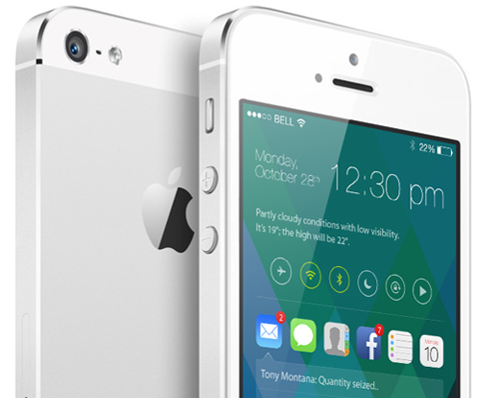
New iOS 8 Concept


iOS 7 may only have been around for six or so weeks, but already, some are looking ahead towards its eventual successor, iOS 8. There’s no doubt that, at least in terms of design, iOS 7 has been the biggest jump in the operating system’s lifespan, but like any piece of software, there’s still plenty of room for improvement both to looks and general functionality. With this in mind, designer Sangam Bhandari has come up with a rather beautiful concept of iOS 8, and even though we do like the changes Apple and Jony Ive have made with 2013′s release, it’s hard to pick holes in this elegant, ingenious figment of Bhandari’s imagination.
The whole idea encircles a revamped home screen, which is a great deal more functional than the current grid of app icons. In spite of the alterations made over the past twelve or so months, it cannot be denied that the home screen is still fairly one-dimensional, but Bhandari’s concept turns this completely on its head.


It works almost as an amalgam of the current Notification Center and Control Center, bringing hordes of information to the fore at a glance. By flitting between icons of your notification-intensive apps – Mail, Messages, Phone et al – you can readily check your notifications directly from your home screen. Presumably, you could also tap on these notifications and deal with them there and then, without the need to open said app, although this is not explicitly detailed in the concept.
As well as functioning a lot better, the concept has a generally inviting and engaging feel to it. A smartphone interface, or any interface for that matter, should be designed to play as nicely with the usership as possible, and this iOS 8 concept really does.
The great thing about this iOS 8 concept is that, despite having much going on, it still manages to look fairly minimal. It’s not overly cluttered with unnecessary add-ons, and as big fans of simple, understated design here at Redmond Pie, we’d definitely call this one a winner.
What do you think? Would you be impressed if, come next year’s WWDC, Apple unveiled something along these design lines, or are you happy with how iOS 7 looks like in its current form? Do share your thoughts below!

Monday, 14 October 2013

Moving away from Android to IPhone/IOS

Following months of expectation, Apple's new iPhones and iOS 7 are both available now, with over half the company's mobile users having already installed the new OS. There's over nine million iPhones sold since launch as momentum returns to the smartphone sector -- and as CIRP reckons a fifth of new iPhone customers previously owned an Android device, there's a good chance a million or so people may need a little help making this transition right now.
Here goes the transition:
Contacts
Contacts are important. Even if your carrier fails to transfer your contacts for you, it's really easy to migrate contacts between the platforms using your Google account.
On your Android device:
  • Tap Menu>Settings>Accounts & Sync and find Google.
  • Tap it and choose your Google account name at the top
  • You'll see a list of Sync settings, tick Sync Contacts
On the iPhone
  • Tap Settings>Mail, Contacts, Calendars>Add Account>Other>Add CardDav Account
  • Enter google.com as the server
  • Input your Google account email address and password
  • Click Next and your contacts should sync
It's also easy to migrate contacts using Gmail and iTunes, just follow the Gmail set-up instructions in Mail, Contacts, Calendars>Add Account. The iPhone will then sync all those Gmail contacts.
If you use a Microsoft Exchange server, the procedure follows:
  • On the iPhone
  • Tap Settings>Mail, Contacts, Calendars>Add Account>
  • Tap Add Account
  • Select Microsoft Exchange
  • Enter your email address and login information
  • (NB: You'll need to enter your Exchange server domain if its hosted)
  • Enter a username is you sync with a real Exchange server
  • Tap Accept, let the sync procedure do its thing.
Alternatively you may want to use the transition between the two platforms as an opportunity to clean up your contacts. One way to combine the two tasks is to work through your contacts emailing or texting only those you want to keep. 
Finally, of course, there's an app for that: Available on Google Play Migration+lets you transfer your contacts between platforms but costs $1.99 (for one export/import procedure).
Calendar
Getting your calendar information into your iPhone isn't too hard:
  • Tap Settings>Mail, Contacts, Calendars
  • Select your Gmail account (or add it)
  • Turn on syncing for Calendars
It’s possible you keep multiple calendars. If you do then visit this Google website and sign into your account. You'll see a list of all your calendars -- just tick the box of the ones you want to sync with your Apple device and click save. You should then see these added the next time you open the Calendars app on your iPhone (once it syncs).
None of the above
Perhaps you didn't use a Google account for all your contacts? There's no reason to panic. Unlike Apple, Google's Android supports external storage media -- and this really comes into its own when exporting your data. As Gizmodo explains: "If your contact information lives in the Android phone's local memory":
  • Open Contacts on your Android, tap the menu and select Import/Export.
  • Select 'Export to SD card
  • Connect the card to your PC or Mac
  • Copy the .vcf file to your desktop
  • Log into your iCloud account using a browser
  • Drag & drop your .vcf card onto 'All Contacts' in iCloud
There are some limitations to the size of .vcf cards you can import into iCloud in one go. These are detailed here.
This discussion forum on the Apple website should also help.
Your media
Your images and videos are important. There's lots of ways to export these between the two platforms, but perhaps the easiest way to port them across to iOS from Android is to use cloud-based services, such as Dropbox.
Dropbox is available on both platforms. Simply export your Android-hosted content to your Dropbox storage account and then download this to your iPhone's app equivalent using the Dropbox app on the other end of the migration.
Alternatively there's a series of neat tricks to achieve this, thanks to Sharon Vaknin:
  • Plug your Android device into your computer and put it into Disk Drive mode.
  • Your phone appears as a drive on the desktop/MyComputer
  • Create a desktop folder for your data migration (call it "Upgrading to iPhone")
  • Then manually go through the files on your Android device, dragging the things you want into that desktop folder.
  • Connect your iPhone (already set-up and activated)
  • Click on your iPhone's name in the sidebar and select Photos in the main window
  • Check Sync Photos, then Choose Folder and navigate to your "Upgrading" folder. Your images will then turn up in your iPhone's Photos app.
  • To transfer the music you want to keep, just drag & drop your "Upgrading" folder to your iPhone's name in the iTunes sidebar.
  • The music will now be imported into iTunes for transfer to the iPhone's Music App.
Google Play
The simplest way to get your Google Play music onto your iOS device comes in the form of the gmusic 2 app. The app lets Google Play Music customers access songs stored in their cloud locker and also enables them to listen to artists from the on-demand All Access catalog. The app supports offline play and plays in the background so you can use other apps while listening to your music.
Google Apps
While you get used to their Apple equivalents, most of the Google apps you've been using on your Android device are also available for your iOS system.
Available apps include Google Maps, Google Earth, Google Translate, Gmail, Chrome, Google Drive, Google Translate, Google+, Hangouts,  YouTube and many more. You can take a look at all the available Google apps for iPad and iPhone here. Google's serious about developing for its closest competitor: if you're a developer you can peruse the current Google app development for iOS job listings here.
Then there are the third party apps. You'll find all the most widely used apps (Facebook, for example) across all major mobile platforms. The fact is that you'll likely find most of the apps you use on Google also available on iOS: however, you may be asked to pay for them again.
Missing tricks
Some of the things hard core Android users will bemoan because they don't exist on iOS include: user-installed widgets, NFC support or the less open nature of the OS. I guess if you're migrating to the iPhone from an Android device, those things probably don't matter to you too much, anyway. Those who these things do matter to probably won't be making the transition.
I hope these tips help make things a little easier for those Android users who do intend migrating to an iOS device -- though it would be helpful were Apple to deliver a simple set of cross-platform tools with which users could more easily engage in the process: even iTunes for Android could make life a little easier.

Friday, 15 February 2013

A must have app: Kik Messenger

80 million users
love Kik

Kik is the fast, simple and personal smartphone messenger.  What's not to love?


80 million users love Kik! It's the fast, simple, and personal smartphone messenger that connects you to everyone you love to talk to.
Here's why you'll love Kik:
FAST: Kik is handsdown the fastest, most reliable smartphone messenger available. And with sent, delivered, read and typing notifications, your conversations will come to life.
SIMPLE: We believe that simplicity is the ultimate in sophistication. We've spent thousands of hours making sure Kik is the easiest, most beautiful smartphone messenger around.
PERSONAL: Your Kik username not your phone number is your Kik identity, so you can keep complete control of your privacy. No wonder Kik is the number one way people connect in other social apps like Instagram, SocialCam, and Viddy.
And now you can do even more on Kik, with new features that let you instantly find and share fun videos, sketches and pictures.
Here's what out users have to say:
"Amazing app! And so, so fast." Katie
"The best way to keep your personal information private." Phil, instagrammers.com "Really easy to use." Amber