Well there arent any new breakthrough in android market since last few weeks but here is a short list of phones which are released in last 3 months, select your perfect christmas gift before its out of stock :P Have a look:
Showing posts with label samsung. Show all posts
Showing posts with label samsung. Show all posts
Friday, 6 December 2013

Thursday, 5 December 2013
Smartphone killed off the Christmas gadget gift
Buying
someone a gadget for Christmas might look harder than ever this year.
In years gone by you might have bought the gadget freak in your life
a peculiar alarm clock, that neat new voice recorder, or even a
gleaming new satnav system. If you really loved
them, you might buy them a video camera, or a digital camera.
Now?
All those functions – the £100 functionality of a satnav, the £500
functionality of a video camera – have been rolled into, swallowed
by, smartphones. A few years ago Vic Keegan, my predecessor, began
trying to count the number of functions that mobile phones (what we'd
now call featurephones) had begun taking onboard. There was the alarm
clock, timer, world clock, address book, music player; quite soon the
camera joined in. Then video came in too – blocky at first, but
increasingly good.
But the arrival in force of the smartphone has accelerated everything. The smartphones available now are general-purpose computers, at least to the extent that developers can think of what to write for them. Satnav functions? Built in to all the major smartphone platforms now. Camera and video function? That's absolutely assumed, and while many phones can't compete directly with a top-end digital SLR, Nokia has set the benchmark until some time in 2015 with the 41-megapixel camera in its Lumia 1020 . But that's just how it is. Sales of digital cameras, camcorders, and satnavs are heading the same way as those of analogue cameras and film. Ask Kodak how that ended.
It's pretty obvious that the smartphone is going to take over any sort of function that can be digitised or computerised. Or, if the task requires a larger canvas – sketching, say, or writing a length, or examining images in detail – that they could be done on a tablet. Or, perhaps, a computer. But those are so cumbersome and hard to carry around.
Controlling lights and heating? Easy with a smartphone or tablet, through Bluetooth and other wireless control systems. Reading books? Yes, can do that too. (Amazon's Kindle app is available for smartphones and tablets – you don't necessarily need a Kindle.) And the app stores aren't underserved either when it comes to trivial apps which don't serve any particular function except to kill time, and aren't "useful" in the normal sense of the word.
So if you are trying to buy something for the person in your life who loves gadgets, you're going to have to think well outside the smartphone-shaped box. It's just over 10 years – April 2003 – since the Innovations Catalogue, that bazaar for the bizarre, was axed. It offered such wonders as revolving wine racks, heated eyelash curlers, and a hammock that didn't need trees. Now those were things and functions that you couldn't absorb into a computer. And no doubt they came from the wellspring of a very human imagination. A revolving wine rack! Of course!
Don't
worry. A quick search suggests that there's no shortage of sites
offering completely useless gadgets at entirely reasonable prices.
Right now I'm looking at a Death Star cookie jar (£35), a Tetris
light (rearrange the shapes and colours to your taste! £30), zombie
head decanter (such a fine holder for that 30-year-old brandy; £20).
And oh, so much more which can never be done by a computer. Because,
apart from anything, who would want to?
Monday, 2 December 2013
Free Internet for Warid customers all around pakistan
Free Internet for Warid customers
As i have posted the workaround for free ufone internet here now i have found a work around for warid also...
- Connection Name: warid
- APN: waridwap
- Proxy: 10.20.4.32
- Port: 2500
Just start by adding a new connection in your android or any other phone like the following:
Just save your settings and re-enable your connection or simply just restart your phone!
Now for android (root required) to use all the application you need to use a proxy tunneling application like (my fav) ProxyDroid visit Configure the settings as shown here and restart your connection.
Thats it!
Tuesday, 12 November 2013
Google Nexus 5 Camera [TWEAK]

Google has been creating waves yet again with their recently launched Nexus 5 running on the new Android 4.4, KitKat with the two most talked about things being its camera and the other exciting features that the latest Android variant has to offer. Even though the Nexus 5 has a fairly decent shooter, it is still not as good as those found in the Samsung Galaxy S4 and the Note 3. For those who have already purchased a Nexus 5 and/if they haven’t been impressed with its camera need not to be worried about anything. Our friends at XDA are currently working on a new camera app that promises to add a host of new features and at the same time also improves the camera’s overall performance. Here’s a quick look at what we should expect to see with the new camera app update:
- Sound Recording now in Stereo with the secondary Mic
- Faster Focusing for the camera
- Front Camera also records 720P Videos@ 20 Mb/s
- Front camera Audio Bitrate@ 192000 Kb/s
- AntiBanding default set to 50Hz
- Focus Range Adjusted
- Enhanced Smooth Zoom
- Turned Edge Enhancement ON
For those of you who have already rooted their devices can head on over to the XDA forum, choose your desired zip file and download the pack. So how did you like the new camera experience ? Do share in your experiences with us.
Note: Kindly download and install the app entirely at your own risk. TAP would not be held eligible for any damage done to the device during/after the installation.
The new Google Nexus 5

Google’s most anticipated device of the year, the Nexus 5 has finally arrived in the Play Store ending days (and months) of speculations, leaks and rumors. The Nexus 5 does manage to live up to its much anticipated hype and the one department where it tends to stand out from the rest is most certainly its camera that comes bundled with Optical Image Stabilization (OIS) a feature that is currently missing in any of the other high end devices available in the market; so credit should be given to LG (Google have decided to stick with them after the success of the Nexus 4) for making it available for the Nexus 5.
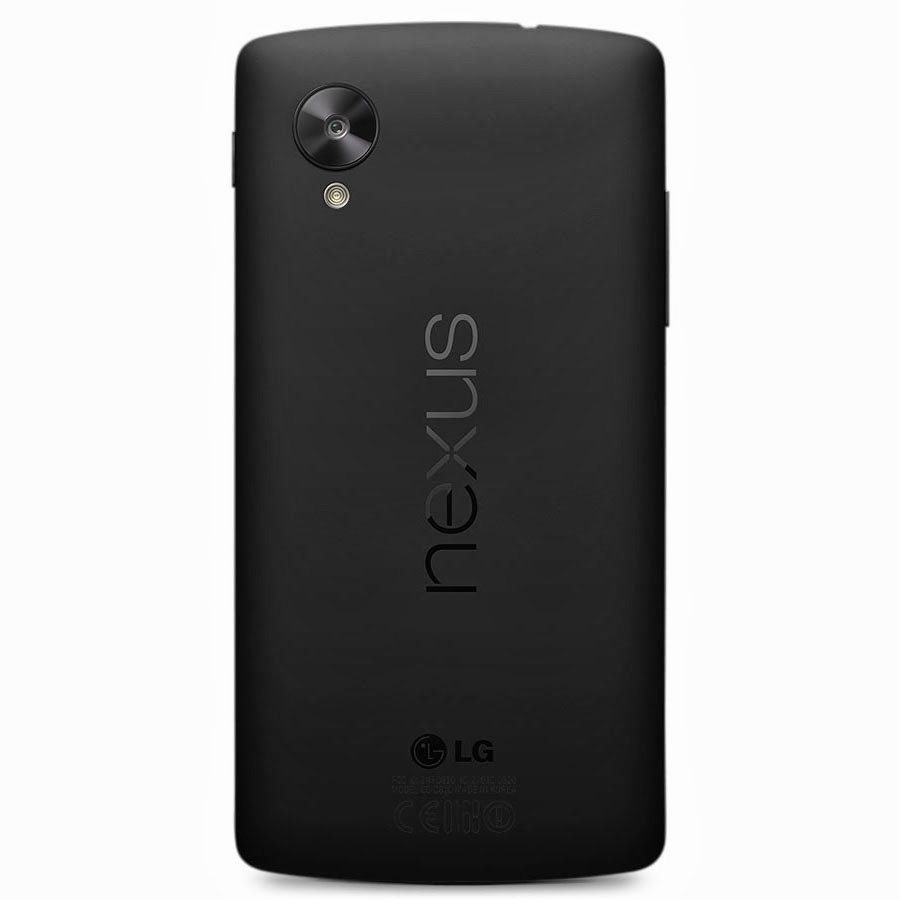

The Nexus 5 is now available in the Play Store in two variants, 16GB and 32GB and priced at $349 and $399 respectively. The smartphone comes in two colors Black and White, though only the back of the device color changes from the front it is Black only. As far as carriers are concerned, we have come across Sprint and T-Mobile who are currently the only two official carriers for the device. Sprint is said to launch the device on November 8th with the 16GB version available for $150 and the 32GB for $200. T-Mobile on the other hand haven’t confirmed a release date as yet but it is expected that the device would be launching soon (hopefully before Christmas).

When it comes to hardware and features, the Nexus 5 thoroughly deserves to be in-line with the other higher end devices currently available in the market is the only device (for now) to be running on Google’s latest Android 4.4, KitKat. Anyone of you interested in placing an order anytime soon ? For those who have already got their hands on the device may feel free to share in their experience with us. Cheers !
Nexus 5 Specs at a Glance
- 5-inch display with 1920×1080 resolution
- Qualcomm Snapdragon™ 800, 2.3GHz
- 2GB of RAM
- 8 megapixel rear camera, 1.3 megapixel front camera
- Android 4.4 KitKat
- 16GB / 32GB of internal storage
- WiFi ac, NFC, and Bluetooth 4.0 LE
- 2,300 mAh battery with wireless charging built-in
- microUSB with SlimPort
Monday, 14 October 2013
Moving away from Android to IPhone/IOS
Following months of expectation, Apple's new iPhones and iOS 7 are both available now, with over half the company's mobile users having already installed the new OS. There's over nine million iPhones sold since launch as momentum returns to the smartphone sector -- and as CIRP reckons a fifth of new iPhone customers previously owned an Android device, there's a good chance a million or so people may need a little help making this transition right now.
Here goes the transition:
Contacts
Contacts are important. Even if your carrier fails to transfer your contacts for you, it's really easy to migrate contacts between the platforms using your Google account.
On your Android device:
- Tap Menu>Settings>Accounts & Sync and find Google.
- Tap it and choose your Google account name at the top
- You'll see a list of Sync settings, tick Sync Contacts
On the iPhone
- Tap Settings>Mail, Contacts, Calendars>Add Account>Other>Add CardDav Account
- Enter google.com as the server
- Input your Google account email address and password
- Click Next and your contacts should sync
It's also easy to migrate contacts using Gmail and iTunes, just follow the Gmail set-up instructions in Mail, Contacts, Calendars>Add Account. The iPhone will then sync all those Gmail contacts.
If you use a Microsoft Exchange server, the procedure follows:
- On the iPhone
- Tap Settings>Mail, Contacts, Calendars>Add Account>
- Tap Add Account
- Select Microsoft Exchange
- Enter your email address and login information
- (NB: You'll need to enter your Exchange server domain if its hosted)
- Enter a username is you sync with a real Exchange server
- Tap Accept, let the sync procedure do its thing.
Alternatively you may want to use the transition between the two platforms as an opportunity to clean up your contacts. One way to combine the two tasks is to work through your contacts emailing or texting only those you want to keep.
Finally, of course, there's an app for that: Available on Google Play Migration+lets you transfer your contacts between platforms but costs $1.99 (for one export/import procedure).
Calendar
Getting your calendar information into your iPhone isn't too hard:
- Tap Settings>Mail, Contacts, Calendars
- Select your Gmail account (or add it)
- Turn on syncing for Calendars
It’s possible you keep multiple calendars. If you do then visit this Google website and sign into your account. You'll see a list of all your calendars -- just tick the box of the ones you want to sync with your Apple device and click save. You should then see these added the next time you open the Calendars app on your iPhone (once it syncs).
None of the above
Perhaps you didn't use a Google account for all your contacts? There's no reason to panic. Unlike Apple, Google's Android supports external storage media -- and this really comes into its own when exporting your data. As Gizmodo explains: "If your contact information lives in the Android phone's local memory":
- Open Contacts on your Android, tap the menu and select Import/Export.
- Select 'Export to SD card
- Connect the card to your PC or Mac
- Copy the .vcf file to your desktop
- Log into your iCloud account using a browser
- Drag & drop your .vcf card onto 'All Contacts' in iCloud
There are some limitations to the size of .vcf cards you can import into iCloud in one go. These are detailed here.
This discussion forum on the Apple website should also help.
Your media
Your images and videos are important. There's lots of ways to export these between the two platforms, but perhaps the easiest way to port them across to iOS from Android is to use cloud-based services, such as Dropbox.
Dropbox is available on both platforms. Simply export your Android-hosted content to your Dropbox storage account and then download this to your iPhone's app equivalent using the Dropbox app on the other end of the migration.
Alternatively there's a series of neat tricks to achieve this, thanks to Sharon Vaknin:
- Plug your Android device into your computer and put it into Disk Drive mode.
- Your phone appears as a drive on the desktop/MyComputer
- Create a desktop folder for your data migration (call it "Upgrading to iPhone")
- Then manually go through the files on your Android device, dragging the things you want into that desktop folder.
- Connect your iPhone (already set-up and activated)
- Click on your iPhone's name in the sidebar and select Photos in the main window
- Check Sync Photos, then Choose Folder and navigate to your "Upgrading" folder. Your images will then turn up in your iPhone's Photos app.
- To transfer the music you want to keep, just drag & drop your "Upgrading" folder to your iPhone's name in the iTunes sidebar.
- The music will now be imported into iTunes for transfer to the iPhone's Music App.
Google Play
The simplest way to get your Google Play music onto your iOS device comes in the form of the gmusic 2 app. The app lets Google Play Music customers access songs stored in their cloud locker and also enables them to listen to artists from the on-demand All Access catalog. The app supports offline play and plays in the background so you can use other apps while listening to your music.
Google Apps
While you get used to their Apple equivalents, most of the Google apps you've been using on your Android device are also available for your iOS system.
Available apps include Google Maps, Google Earth, Google Translate, Gmail, Chrome, Google Drive, Google Translate, Google+, Hangouts, YouTube and many more. You can take a look at all the available Google apps for iPad and iPhone here. Google's serious about developing for its closest competitor: if you're a developer you can peruse the current Google app development for iOS job listings here.
Then there are the third party apps. You'll find all the most widely used apps (Facebook, for example) across all major mobile platforms. The fact is that you'll likely find most of the apps you use on Google also available on iOS: however, you may be asked to pay for them again.
Missing tricks
Some of the things hard core Android users will bemoan because they don't exist on iOS include: user-installed widgets, NFC support or the less open nature of the OS. I guess if you're migrating to the iPhone from an Android device, those things probably don't matter to you too much, anyway. Those who these things do matter to probably won't be making the transition.
I hope these tips help make things a little easier for those Android users who do intend migrating to an iOS device -- though it would be helpful were Apple to deliver a simple set of cross-platform tools with which users could more easily engage in the process: even iTunes for Android could make life a little easier.
Friday, 15 February 2013
Free Ufone internet on Android (Complete)
Hello all,
All around Pakistan, people are struggling to run free internet on android from ufone... here is a detailed walkthrough on activating and running internet with full functionality... with full support for browsing and running apps like facebook, whatsapp, kik, viber etc.. n not to forget skype :P
Activating Ufone Internet on Android
~~~~ ROOT REQUIRED ~~~~
So here are the main settings:
1. MOST IMPORTANT: Deactivate GPRS and Activate only MMS (Use Ufone Self Care Portal)
2. Menu > Settings > Wireless & networks > Mobile networks > Data enabled: ON
3. Menu > Settings > Wireless & networks > Mobile networks > Access Point Names > NEW APN:
Name: Ufone Free
APN: ufone.pmms
Proxy: 172.16.13.26
Port: 8080
Username: *Leave Blank*
Password: *Leave Blank*
Server: *Leave Blank*
MMSC: *Leave Blank*
MMS Proxy: *Leave Blank*
MMS Port: *Leave Blank*
MCC: 410
MNC: 03
Authentication Type: None
APN Type: *Leave Blank*
APN Protocol: IPv4


4. Menu > Settings > Wireless & networks > Wi-Fi Settings > Advanced > Use static IP: ON
IP address: *Leave Blank*
Gateway: *Leave Blank*
Netmask: *Leave Blank*
DNS 1: 212.72.23.30 or 172.16.13.219(ufone)
DNS 2: 212.72.23.31 or 203.82.48.3(ufone)
Or simply you can give Google's DNS Servers : Primary: 8.8.8.8 Secondary:8.8.4.4

Workaround for changing DNS
If your set dont have dns settings, then you have to download an app from Google Play Store, named DNS Changer
Link: https://play.google.com/store/apps/details?id=com.eddypcz.dnschanger
Link: https://play.google.com/store/apps/details?id=com.eddypcz.dnschanger
Problems with ufone.pmms
Many have faced this problem, when changing apn to ufone.pmms, thier edge sign (E) disappears. This is due to this configuration of the os ip configuration limits set by manufacturer... now when the phone connects to mms server, it gets ip address from the server, but doesnt get the dns thats why the phone reconises it as bad connection...
Now we can override this by a simple administrative tool builtin android system by following these steps...
1) Dial *#*#4636#*#*
2) Tap phone information
3) Scroll down and tap on TOGGLE DNS CHECK
4) NOW Wait for few seconds. .... done
Now u will see the (E) sign is back
Another workaround for ufone.pmms problem
In some phone there is problem in getting into phone info menu with 4636 dail menu (as mentioned above)... we still have another way...
Install this app (Network) from play store Link: https://play.google.com/store/apps/details?id=de.mangelow.network and this will also work the same way the info menu supposed to do...

As the screen shows the the TOGGLE DNS CHECK have been tapped already...
My Beloved Launcher: Holo Launcher
Holo Launcher is a highly customizable launcher replacement based on the stock ICS 4.0.4 Launcher. But you can run it on Android 2.2+
Basic Features:
Plus Features:
Holo Launcher on Play Store
Holo Launcher Plus on Play Store
Links:
Holo Launcher HD
Holo Locker
Holo Launcher Stable APK
Holo Launcher Beta APK
Holo Launcher User Voice
Holo Launcher Translation

Basic Features:
- Full ICS Style: ICS Icons, Folders, Outlines, Drawer Tabs, etc.
- Custom Desktop Pages/Grid: Up to 9 desktop pages and 10 x 10 grid.
- Custom Drawer Portrait/landscape Grid
- Scrollable Dock: Up to 7 icons per page and up to 3 pages.
- Infinite Scrolling
- Gestures: Swipe up/down on desktop to launch apps quickly.
- Customizable shortcut/folder icons, support ADW icon pack.
- Desktop Previews: Pinch to access desktop previews.
- Backup and Restore: Backup and restore your settings and shortcuts.
- Other Customization Options: Keep in memory, home key action, hide apps in drawer, hide labels, etc.
Plus Features:
- Multiple configurable drawer tabs
- Unread count notifications for call, sms and gmail
- More desktop gestures: Pinch in/out, Two Finger Swipe and Double-tap
- Dock icon Swipe up/down gestures
- More transition effects
- Widgets overlapping
- 1x1 widgets in dock
- Other enhancement and customization options
Holo Launcher on Play Store
Holo Launcher Plus on Play Store
Links:
Holo Launcher HD
Holo Locker
Holo Launcher Stable APK
Holo Launcher Beta APK
Holo Launcher User Voice
Holo Launcher Translation
LATEST FROER ROM: M130K_WC21@froer_MoD.Final_0506.7z
He did it again: FINAL REVISED VERSION
For everyone to enjoy... Post your review when you have time.
Thank you FROER!
For all who have requested me for the file!
Froer's note: (translated using google translate)
Posted by froer 2012-5-6 17:58
WC21 should be the last official 2.3.6 and a ROM! So there is to do the idea of a final version of the ROM, but usually too busy, on and off for more than a month before the spare time. BS! Play a day found no bugs, perfect, at least in his own heart, supporting the S3 price to a reasonable level should be no problem (I hope and ideas to see S3 version), we Liugejinian
1, Chinese the M130K official WC21 firmware to support Chinese and English language;
Amendment Chinese SMS program operators to correctly identify the GSM character, to amend the largest recipient (100), to write the content of messages more than six automatic conversion for MMS;
3, off by default the automatic dialing of network roaming, dual clock roam;
Amendments to communication records do not display the message record;
5, the amendment to reject the automatic SMS reply function;
6, for the M130K compile the drop-down six key switch, quick switch to increase the data network;
7, exclusive to crack Diopen input method support, Qwery, Jiugong, handwriting, full-screen handwriting four input method;
8, Galaxy S2, transparent weather and clock widget and odex of;
9, system components, the Galaxy S2, icons beautify;
10, repair of characters missing from the date of the lock screen "to repair the missing characters in the message dialogue program" Day ";
11, modify the Camera shutter button to mute (focus sound unmodified)
12, update the Google, Google search, Gmail, components
13, the ROM to minimize modifications system program odex, zipalign optimization
ROM is why the state does not ROOT release?
ROOT is very simple, but ROOT ROM restore the original clean ROM too much trouble, so according to their own ROOT.
The weather component why not use the data of Sina?
Do you think China's official weather forecast on the quasi-? AccuWeather weather data released by the independent company.
Subscribe to:
Posts (Atom)