Tuesday, 12 November 2013

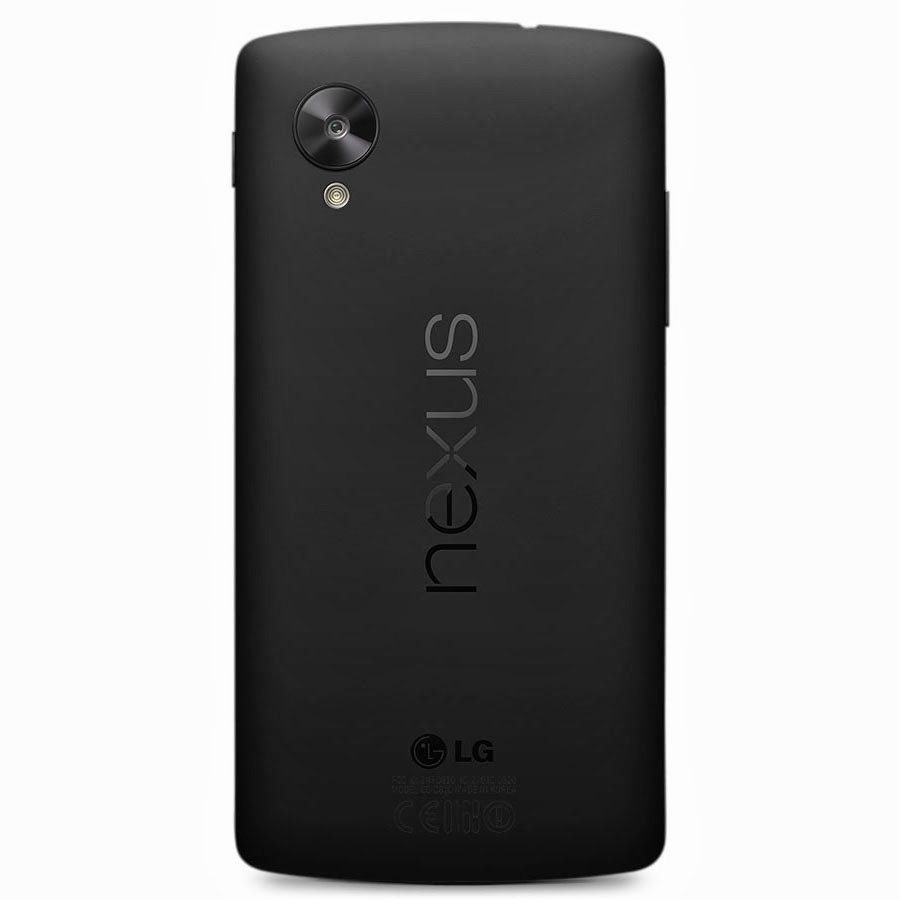
Google Nexus 5 Camera [TWEAK]

Google has been creating waves yet again with their recently launched Nexus 5 running on the new Android 4.4, KitKat with the two most talked about things being its camera and the other exciting features that the latest Android variant has to offer. Even though the Nexus 5 has a fairly decent shooter, it is still not as good as those found in the Samsung Galaxy S4 and the Note 3. For those who have already purchased a Nexus 5 and/if they haven’t been impressed with its camera need not to be worried about anything. Our friends at XDA are currently working on a new camera app that promises to add a host of new features and at the same time also improves the camera’s overall performance. Here’s a quick look at what we should expect to see with the new camera app update:
  • Sound Recording now in Stereo with the secondary Mic
  • Faster Focusing for the camera
  • Front Camera also records 720P Videos@ 20 Mb/s
  • Front camera Audio Bitrate@ 192000 Kb/s
  • AntiBanding default set to 50Hz
  • Focus Range Adjusted
  • Enhanced Smooth Zoom
  • Turned Edge Enhancement ON
For those of you who have already rooted their devices can head on over to the XDA forum, choose your desired zip file and download the pack. So how did you like the new camera experience ? Do share in your experiences with us.
Note: Kindly download and install the app entirely at your own risk. TAP would not be held eligible for any damage   done to the device during/after the installation.

The new Google Nexus 5


Google’s most anticipated device of the year, the Nexus 5 has finally arrived in the Play Store ending days (and months) of speculations, leaks and rumors. The Nexus 5 does manage to live up to its much anticipated hype and the one department where it tends to stand out from the rest is most certainly its camera that comes bundled with Optical Image Stabilization (OIS) a feature that is currently missing in any of the other high end devices available in the market; so credit should be given to LG (Google have decided to stick with them after the success of the Nexus 4) for making it available for the Nexus 5.
                           

The Nexus 5 is now available in the Play Store in two variants, 16GB and 32GB and priced at $349 and $399 respectively. The smartphone comes in two colors Black and White, though only the back of the device color changes from the front it is Black only. As far as carriers are concerned, we have come across Sprint and T-Mobile who are currently the only two official carriers for the device. Sprint is said to launch the device on November 8th with the 16GB version available for $150 and the 32GB for $200. T-Mobile on the other hand haven’t confirmed a release date as yet but it is expected that the device would be launching soon (hopefully before Christmas).

When it comes to hardware and features, the Nexus 5 thoroughly deserves to be in-line with the other higher end devices currently available in the market is the only device (for now) to be running on Google’s latest Android 4.4, KitKat. Anyone of you interested in placing an order anytime soon ? For those who have already got their hands on the device may feel free to share in their experience with us. Cheers !

Nexus 5 Specs at a Glance

  • 5-inch display with 1920×1080 resolution
  • Qualcomm Snapdragon™ 800, 2.3GHz
  • 2GB of RAM
  • 8 megapixel rear camera, 1.3 megapixel front camera
  • Android 4.4 KitKat
  • 16GB / 32GB of internal storage
  • WiFi ac, NFC, and Bluetooth 4.0 LE
  • 2,300 mAh battery with wireless charging built-in
  • microUSB with SlimPort

Thursday, 7 November 2013

New iOS 8 Concept


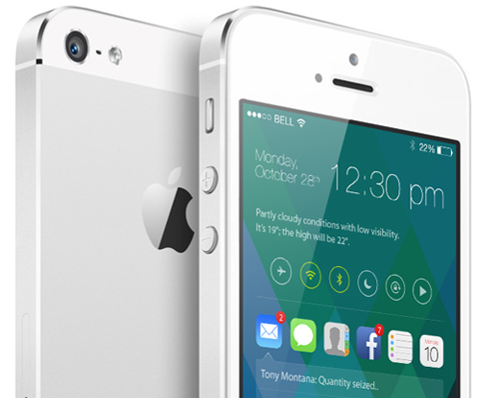
iOS 7 may only have been around for six or so weeks, but already, some are looking ahead towards its eventual successor, iOS 8. There’s no doubt that, at least in terms of design, iOS 7 has been the biggest jump in the operating system’s lifespan, but like any piece of software, there’s still plenty of room for improvement both to looks and general functionality. With this in mind, designer Sangam Bhandari has come up with a rather beautiful concept of iOS 8, and even though we do like the changes Apple and Jony Ive have made with 2013′s release, it’s hard to pick holes in this elegant, ingenious figment of Bhandari’s imagination.
The whole idea encircles a revamped home screen, which is a great deal more functional than the current grid of app icons. In spite of the alterations made over the past twelve or so months, it cannot be denied that the home screen is still fairly one-dimensional, but Bhandari’s concept turns this completely on its head.


It works almost as an amalgam of the current Notification Center and Control Center, bringing hordes of information to the fore at a glance. By flitting between icons of your notification-intensive apps – Mail, Messages, Phone et al – you can readily check your notifications directly from your home screen. Presumably, you could also tap on these notifications and deal with them there and then, without the need to open said app, although this is not explicitly detailed in the concept.
As well as functioning a lot better, the concept has a generally inviting and engaging feel to it. A smartphone interface, or any interface for that matter, should be designed to play as nicely with the usership as possible, and this iOS 8 concept really does.
The great thing about this iOS 8 concept is that, despite having much going on, it still manages to look fairly minimal. It’s not overly cluttered with unnecessary add-ons, and as big fans of simple, understated design here at Redmond Pie, we’d definitely call this one a winner.
What do you think? Would you be impressed if, come next year’s WWDC, Apple unveiled something along these design lines, or are you happy with how iOS 7 looks like in its current form? Do share your thoughts below!

Tuesday, 22 October 2013

Android Kit-Kat

October's shaping up to be an epic month for gadget fans, with Google reportedly planning to unleash the latest cut of Android - 4.4 KitKat – the week before Apple unveils the new iPad and iPad Mini. If the latest rumours are to be believed, we're now only days from the launch.
Here’s what we know about the imminent update to earth's most popular mobile OS, and also what we’d like to see from Android’s response to iOS 7. We’re keeping this page bang up to date with KitKat 4.4 news as it happens.

WHY THE KITKAT NAME?

As you know, Google names each iteration of Android after a different confectionary - from Cupcake through to today’s Jelly Bean. For months, we were lead to believe that the next Android release would be called Key Lime Pie, and that we would see it before the end of 2013. Key Lime Pie would mark a serious jump in Android point releases, taking us from today’s 4.3 straight through to 5.0.
Android KitKat wrapper
So when Google proudly announced that the next big release would be 4.4 and called KitKat, there’s was excitement, confusion... and some sniggering from the back rows.
It turns out that Google’s choice of the KitKat name is more than an affection nod to the chocalate bar; the two companies are using the Android launch to promote each others' wares. You’ve probably already seen NestlĂ©’s affectionate video, released almost immediately after the KitKat unveiling.  
We’re told that no money changed hands between Google and NestlĂ© in choosing the name, but the scale of the you-scratch-my-back promotion is formidable - we’ll call our world-famous operating system after your chocolate bar, and in return you promote our funky OS through your massive distribution and advertising network.

WHAT CAN YOU EXPECT?

UPDATE 12.10 KitKat may have a launcher that you can use on your Samsung or HTC, turning the interface into vanilla Android in place of TouchWiz or Sense.Android 4.4 KitKat - What can you expect? 2Android 4.4 KitKat - What can you expect? 3Android 4.4 KitKat - What can you expect? 4
The team over at Android Police have been studying the KitKat log file leaked tomyce. In the files, they've found reference to an apk called com.google.android.gel - with 'gel' standing for Google Experince Launcher. The formatting of the apk file name is the same as that used for previously system-only Android apps that were released to the Play Store earlier this year (Calendar, for example), fuelling a theory that the Google Experience Launcher may be freely available to download.
We've included an image showing the Google Experience Launcher prompt screen, although Artem Russakovski at Android Police is careful to point that it is a mock-up designed to protect sources: "Rather than not posting any visuals at all, we opted for mockup images of Google Experience, masterfully designed by our own Liam Spradlin. They paint a relatively accurate picture, but may be off on some details (whether purposely or not)."
The theory bring a whole new meaning to the strapline being used on the KitKat promo site - ‘it’s for everybody’.
UPDATE 11.10 KitKat will launch on October 15, apparently according to developers at a Google event this week. The only thing confusing the hell out of us is the absence of any invites to a launch (usual form in the tech business, especially for something as significant as this). Also leaked this week were screenshots showing an overhaul of the location access screens in settings.
KitKat leaks to date have consisted of short, badly shot boot and lock screen videos in a pub (complete with background expletives) along with an accidentally released keyboard screenshot. There’s also been a build of KitKat - KRS74D - identified in a Chrome bug tracker site, spotted exclusively by myce.
The log file from that build all but confirms the Nexus 5 running KitKat 4.4, showing that the handset has a 443ppi, 1920x1080 screen, and will support wireless charging. And mysteriously, screenshots also show two totally brand new Google icons in the menu bar. 
In the last few weeks, a few credible screenshots have emerged of the messaging app and dialer, along with a whole bunch of screenshots showing that Settings now have new subsections for printing and payments. The latter infers that the ability to pay for stuff will now be baked into the OS, which will be nice. The lucky author claims that KitKat is only a light evolution from JellyBean in terms of design, but that animations are smoother. The leaked OS also has more Google apps in the default install - including Keep, Drive and QuickOffice (all of which you can of course download from Google Play now...).
We can also make some educated guesses. Google's open approach to customisation of Android by handset manufacturers has enabled the system to grow in popularity at an awesome pace. But it has also led to fragmentation - just look at the number of today’s superstar Android handsets packing different point releases of the OS (so while the Nexus 4 is on the latest-and-greatest 4.3, the magnificent HTC One and even the newer Sony Xperia Z1 are stuck on 4.2.2).
One theory is that 4.4 will be easier for the world’s handset manufacturers to integrate into their own road maps by offering broader firmware compatibility - so older handsets will be able to upgrade, and you’ll get faster updates on newer models.  
This compliments chatter at Google I/O earlier this year that future Android releases would be less dramatic. Instead of trying to coax (or force) manufacturers into keeping pace with their release schedule, Google would instead ‘snap off’ key OS components and apps, and update them often through the Play Store. But more on that later...
You can also be fairly sure that 4.4 will mark updates to Android’s stock theme. Only last week, a screenshot illustrating the Google Korean IME keyboard on Google Play showed a new white and grey theme to its icons (the screenshots have since been replaced by today’s cyan blue Holo theme). 
Since that leak, we’ve also seen the aforementioned messaging and dialer screens. These seem to suggest that Android’s notifications bar will be skinnable to suit the open application (so the battery and radio icons turn to green in messaging, or blue in the new dialer).
Lastly, Google very recently updated the Android GMail app. We could be reading way too much into this, but the update features an even more minimal interface, with a card style to the conversation view that's losely reminiscent of Google Now. Is this to bring it into line with KitKat interface changes?

WHAT WOULD WE LIKE?

In so many ways, Android still has iOS 7 beaten.
Widgets? Android. Actionable notifications (for example, reply to an email)? Android. Expandable storage? Android. Multi-tasking that lets you see between five and nine screens at a time? Android. Multiple user accounts? You guessed it. 
But although iOS 7 may have split opinions in the Apple camp, it would be foolish for Google to think that it didn’t need to accelerate the arms race. So here are some the features we’d love to see in KitKat 4.4...

MERGE GOOGLE NOW WITH THE NOTIFICATIONS SCREEN

Google Now
Google Now is discreetly becoming Skynet. In recent months, the service that mashes traditional search with prediction has gained even greater brain power - for US users, it will scan your email to spot when you’re travelling, and what you’ve bought, and begin pushing ‘useful’ info to help you before you know that you need helping.
Although this can be eerie, Now’s predictive skills are beginning to master the party trick that’s the dream of every search engineer: have the information you need when you need it, with zero effort on your part.
Google Now is already integrated with Android’s swipe-down notifications screen. But we’d love to see it go one step further - find a way to show those Google Now cards within that screen’s real estate. Now that would be useful...

BUILD THE MOTO X VOICE ACTIVATION SYSTEM INTO ANDROID CORE

‘OK, Google Now - wake me up in 20 minutes…’. 
Motorola Moto X
The US-only, midrange Motorola Moto X phone boasts a new twist on voice activation that - sadly - is unique to it right now. The X is ‘always’ listening - you can wake it by saying ‘OK, Google Now…’, then give it an order, or ask a tricky question. We understand that it’s a major selling point for the Moto X, but we’d struggle to believe that Google doesn’t have the service running on an Android core somewhere in a test lab. 

MAKE THE INTERFACE EVEN PRETTIER

Android 4.4 KitKat dialler
It’s easy to forget that Android was the iOS’s ugly cousin only a few years ago. Jelly Bean was the first release to give the OS a truly handsome skin and smooth animations. And prior to the release of Android’s Holo design guidelines, many Play Store apps were ragged compared to their App Store counterparts. 
But with the launch of iOS 7, it’s time that Android took the next leap in visual refinement. We’e already seen a few supposed leaks that shows a re-theming for 4.4, with everything from the the cyan of Holo apparently replaced by grey and white, through to a completely redesigned dialling screen.

WHEN DO I GET IT?

Android 4.4 KitKat - When do I get it? 2Android 4.4 KitKat - When do I get it? 3
Nexus phones traditionally launch in November. So don’t be surprised if you’re pre-ordering your Nexus 5 in late October for delivery early or mid-November. We refuse to believe that it will be much later than this, especially given that the Nexus 4 16GB is now showing as out of stock in the Play Store. And arguably Google has a window in which to launch a serious response to the iPhone 5S.
Samsung, HTC and LG owners will know that the promise of a November launch may not apply to them. 4.2.2, for example, was officially released by Google on February 11, 2013 - it didn’t reach the HTC One until mid-to-late April.
UPDATE 16.10 KitKat's official Twitter account is releasing music-themed cryptic messages. The first message is "Everybody dance now" and so far its most recent Tweet is "This is it". Pocket Lint's Luke Edwards  believes that these messages point to a 28 October release date for the Nexus 5 and Android 4.4. 
'Everybody dance now' refers to the song Gonna Make You Sweat by C+C Music Factory, who were originally called The 28th Street Crew. 'This Is It' is the title of a documentary based on Michael Jackson, which was released on 28 October. . You don't need to wear a in tin foil to see the obvious connections there...
UPDATE 06.10 A rather legitimate-looing service manual for the new LG Nexus 5 has leaked. If it's real, the Nexus 5 has a 4.95in 1080p screen, a Snapdragon 800 processor running at 2.3GHz, a 2300mAh battery, and 2GB RAM. There are also references to both 16GB and 32GB storage capacities.
UPDATE 03.10 Latest rumours suggest that October 14 looks like the official announcement date, with the device shipping in the UK in late October. The same sources also suggest that the Nexus 5 could cost as little as £275, and be available with various on-board storage options, right up to 64GB. And if this snapshot is anything to go by, it may also coincide with the launch of an Asus-made Nexus 10 tablet.
Keep bang up to date with Nexus 5 rumours over here.

WHAT DO YOU WANT FROM KITKAT 4.4?

Is Android overdue a revolutionary overhaul, or would you be delighted with a few cheeky tweaks? Are you just thrilled by the thought of a stand-alone Google Experience Launcher - or will you stick with TouchWiz or Sense?
Let us know what you want from KitKat 4.4 in the comments below.

Monday, 14 October 2013

Moving away from Android to IPhone/IOS

Following months of expectation, Apple's new iPhones and iOS 7 are both available now, with over half the company's mobile users having already installed the new OS. There's over nine million iPhones sold since launch as momentum returns to the smartphone sector -- and as CIRP reckons a fifth of new iPhone customers previously owned an Android device, there's a good chance a million or so people may need a little help making this transition right now.
Here goes the transition:
Contacts
Contacts are important. Even if your carrier fails to transfer your contacts for you, it's really easy to migrate contacts between the platforms using your Google account.
On your Android device:
  • Tap Menu>Settings>Accounts & Sync and find Google.
  • Tap it and choose your Google account name at the top
  • You'll see a list of Sync settings, tick Sync Contacts
On the iPhone
  • Tap Settings>Mail, Contacts, Calendars>Add Account>Other>Add CardDav Account
  • Enter google.com as the server
  • Input your Google account email address and password
  • Click Next and your contacts should sync
It's also easy to migrate contacts using Gmail and iTunes, just follow the Gmail set-up instructions in Mail, Contacts, Calendars>Add Account. The iPhone will then sync all those Gmail contacts.
If you use a Microsoft Exchange server, the procedure follows:
  • On the iPhone
  • Tap Settings>Mail, Contacts, Calendars>Add Account>
  • Tap Add Account
  • Select Microsoft Exchange
  • Enter your email address and login information
  • (NB: You'll need to enter your Exchange server domain if its hosted)
  • Enter a username is you sync with a real Exchange server
  • Tap Accept, let the sync procedure do its thing.
Alternatively you may want to use the transition between the two platforms as an opportunity to clean up your contacts. One way to combine the two tasks is to work through your contacts emailing or texting only those you want to keep. 
Finally, of course, there's an app for that: Available on Google Play Migration+lets you transfer your contacts between platforms but costs $1.99 (for one export/import procedure).
Calendar
Getting your calendar information into your iPhone isn't too hard:
  • Tap Settings>Mail, Contacts, Calendars
  • Select your Gmail account (or add it)
  • Turn on syncing for Calendars
It’s possible you keep multiple calendars. If you do then visit this Google website and sign into your account. You'll see a list of all your calendars -- just tick the box of the ones you want to sync with your Apple device and click save. You should then see these added the next time you open the Calendars app on your iPhone (once it syncs).
None of the above
Perhaps you didn't use a Google account for all your contacts? There's no reason to panic. Unlike Apple, Google's Android supports external storage media -- and this really comes into its own when exporting your data. As Gizmodo explains: "If your contact information lives in the Android phone's local memory":
  • Open Contacts on your Android, tap the menu and select Import/Export.
  • Select 'Export to SD card
  • Connect the card to your PC or Mac
  • Copy the .vcf file to your desktop
  • Log into your iCloud account using a browser
  • Drag & drop your .vcf card onto 'All Contacts' in iCloud
There are some limitations to the size of .vcf cards you can import into iCloud in one go. These are detailed here.
This discussion forum on the Apple website should also help.
Your media
Your images and videos are important. There's lots of ways to export these between the two platforms, but perhaps the easiest way to port them across to iOS from Android is to use cloud-based services, such as Dropbox.
Dropbox is available on both platforms. Simply export your Android-hosted content to your Dropbox storage account and then download this to your iPhone's app equivalent using the Dropbox app on the other end of the migration.
Alternatively there's a series of neat tricks to achieve this, thanks to Sharon Vaknin:
  • Plug your Android device into your computer and put it into Disk Drive mode.
  • Your phone appears as a drive on the desktop/MyComputer
  • Create a desktop folder for your data migration (call it "Upgrading to iPhone")
  • Then manually go through the files on your Android device, dragging the things you want into that desktop folder.
  • Connect your iPhone (already set-up and activated)
  • Click on your iPhone's name in the sidebar and select Photos in the main window
  • Check Sync Photos, then Choose Folder and navigate to your "Upgrading" folder. Your images will then turn up in your iPhone's Photos app.
  • To transfer the music you want to keep, just drag & drop your "Upgrading" folder to your iPhone's name in the iTunes sidebar.
  • The music will now be imported into iTunes for transfer to the iPhone's Music App.
Google Play
The simplest way to get your Google Play music onto your iOS device comes in the form of the gmusic 2 app. The app lets Google Play Music customers access songs stored in their cloud locker and also enables them to listen to artists from the on-demand All Access catalog. The app supports offline play and plays in the background so you can use other apps while listening to your music.
Google Apps
While you get used to their Apple equivalents, most of the Google apps you've been using on your Android device are also available for your iOS system.
Available apps include Google Maps, Google Earth, Google Translate, Gmail, Chrome, Google Drive, Google Translate, Google+, Hangouts,  YouTube and many more. You can take a look at all the available Google apps for iPad and iPhone here. Google's serious about developing for its closest competitor: if you're a developer you can peruse the current Google app development for iOS job listings here.
Then there are the third party apps. You'll find all the most widely used apps (Facebook, for example) across all major mobile platforms. The fact is that you'll likely find most of the apps you use on Google also available on iOS: however, you may be asked to pay for them again.
Missing tricks
Some of the things hard core Android users will bemoan because they don't exist on iOS include: user-installed widgets, NFC support or the less open nature of the OS. I guess if you're migrating to the iPhone from an Android device, those things probably don't matter to you too much, anyway. Those who these things do matter to probably won't be making the transition.
I hope these tips help make things a little easier for those Android users who do intend migrating to an iOS device -- though it would be helpful were Apple to deliver a simple set of cross-platform tools with which users could more easily engage in the process: even iTunes for Android could make life a little easier.

Friday, 15 February 2013

Free Ufone internet on Android (Complete)


Hello all,


All around Pakistan, people are struggling to run free internet on android from ufone... here is a detailed walkthrough on activating and running internet with full functionality... with full support for browsing and running apps like facebook, whatsapp, kik, viber etc.. n not to forget skype :P


Activating Ufone Internet on Android

~~~~ ROOT REQUIRED ~~~~

So here are the main settings:

1. MOST IMPORTANT: Deactivate GPRS and Activate only MMS (Use Ufone Self Care Portal)
2. Menu > Settings > Wireless & networks > Mobile networks > Data enabled: ON
3. Menu > Settings > Wireless & networks > Mobile networks > Access Point Names > NEW APN:

Name: Ufone Free
APN: ufone.pmms
Proxy: 172.16.13.26
Port: 8080
Username: *Leave Blank*
Password: *Leave Blank*
Server: *Leave Blank*
MMSC: *Leave Blank*
MMS Proxy: *Leave Blank*
MMS Port: *Leave Blank*
MCC: 410
MNC: 03
Authentication Type: None
APN Type: *Leave Blank*
APN Protocol: IPv4


4. Menu > Settings > Wireless & networks > Wi-Fi Settings > Advanced > Use static IP: ON

IP address: *Leave Blank*
Gateway: *Leave Blank*
Netmask: *Leave Blank*
DNS 1: 212.72.23.30 or 172.16.13.219(ufone)
DNS 2: 212.72.23.31 or 203.82.48.3(ufone)

Or simply you can give Google's DNS Servers : Primary: 8.8.8.8 Secondary:8.8.4.4


Workaround for changing DNS

If your set dont have dns settings, then you have to download an app from Google Play Store, named DNS Changer
Link: https://play.google.com/store/apps/details?id=com.eddypcz.dnschanger


Note: Internet Speed may vary upon AREA and Handset. I have EDGE im my Area of service so i get speeds from 10kB/s to 25KB/s


Problems with ufone.pmms

Many have faced this problem, when changing apn to ufone.pmms, thier edge sign (E) disappears. This is due to this configuration of the os ip configuration limits set by manufacturer... now when the phone connects to mms server, it gets ip address from the server, but doesnt get the dns thats why the phone reconises it as bad connection...
Now we can override this by a simple administrative tool builtin android system by following these steps...

1) Dial *#*#4636#*#*
2) Tap phone information
3) Scroll down and tap on TOGGLE DNS CHECK
4) NOW Wait for few seconds. .... done 
Now u will see the (E) sign is back

Another workaround for ufone.pmms problem

In some phone there is problem in getting into phone info menu with 4636 dail menu (as mentioned above)... we still have another way... 
Install this app (Network) from play store Link: https://play.google.com/store/apps/details?id=de.mangelow.network and this will also work the same way the info menu supposed to do...

As the screen shows the the TOGGLE DNS CHECK have been tapped already...